

NecroDice
A digital solution for Necromunda’s custom dice
Problem
The tabletop game Necromunda by Games Workshop is one of my favourite games. However, it uses a unique set of dice. These dice are often produced in limited runs, and when they are out of print, players like me must venture into the second-hand market, where prices can border on the extortionate. This is the problem I set out to fix.
Context
As part of my Boot.dev programming course, I was tasked with creating a project entirely on my own that solved a real‑world problem I personally faced.
My idea was simple: "What if there was an app that could roll Necromunda’s custom dice digitally?"
I built the first version as a CLI tool. It worked, but it wasn’t user‑friendly — players had to type commands like ‘3 attack, 2 wound’ to roll dice. It solved the dice availability problem, but not the usability problem.
This case study focuses on designing the UI that would turn that CLI tool into a real, accessible app

CLI version of the app.
Goals
-
Create a simple, readable interface for selecting and rolling dice
-
Make the icons match the physical dice so players recognise them instantly
-
Keep the layout clean on small screens
-
Add a Help page for new players
-
Make the whole thing feel like a proper app instead of a command‑line tool
Process
My first action was to check which the most common phone screen size was; I saw that Figma has template sizes that were a similar size and used that. I then began building the main page of the app. Originally, I had thought about having the app limited to one page with the dice menu, roll button, and results table all sharing the screen.

I decided this would make the screen too busy, so I opted to have a separate results screen, making the menu less fiddly and reducing the chances of an unintended input. I also added a ‘clear selection’ button to quickly reset the menu.

At this point, I added a ‘Help’ page, which instructs the user on how the app functions and displays the possible results from the dice rolls and what the icons mean. I also added a little ‘quality-of-life’ feature to highlight any dice with a non-zero counter.
I began to replace the placeholder stock icons I used with ones I created myself. I originally envisioned the app to have a pixel-art style, so I used MS Paint to achieve the desired style.

I started to think about animations for the app. My first thought was to have some motion after the user presses the ‘roll’ button I wanted the results to ‘move in’ from the side. I also continued refining the icons.
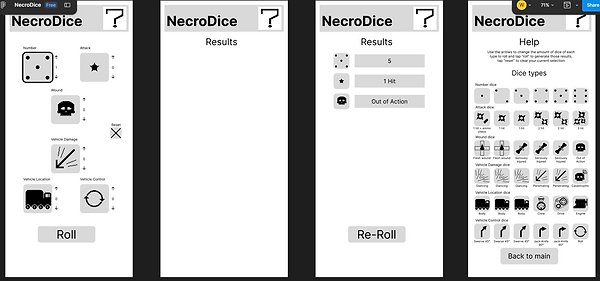
Final UI


Reflection
I’m really happy with how the UI turned out. It’s simple, readable, and feels true to the game. There’s room for future features, but the core experience is solid. This project taught me a lot about turning a CLI tool into a real interface, and it confirmed that I really enjoy UI‑focused design work.
One feature I’d like to explore in the future is the “scatter” mechanic from Necromunda. Physically, this uses a die with arrows on each face to determine direction. Digitally, I imagine this could work by holding the device above the game piece and pressing a button that spins a compass to generate a direction. It would be a fun challenge to design and would make the app even more useful during gameplay.